
The shared brain behind every project, task and booking.
Your projects, tasks, team conversations and schedule already live in Cirkus. Now the AI your team uses can understand all of it, and get work moving, with exactly the access of the person asking.
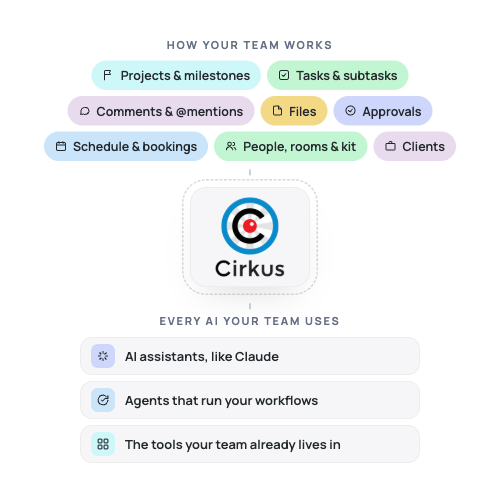
AI is only as useful as what it knows about your work.
Ask a general AI assistant which tasks are blocking Thursday’s show, what the client decided in last week’s thread, or who picked up the fault from the night shift. It has no idea.
The answers live in your projects, task lists, comment threads and schedule. So people copy, paste and re-explain, usually when the clock is already running.
Cirkus already holds that shared picture of the work. We’re opening it up, safely, to the AI your team chooses.
Projects, tasks and the schedule, finally in the same conversation.
Most tools hold one of these. Cirkus holds all three and how they connect, so your AI sees the whole job, not just a slice of it.
The why and the what
Projects, subprojects, milestones, clients and templates. Your AI understands what each piece of work is for, who it's for, and where it stands.
“Set up a new project for [Client] from our standard template.”
The who and the how
Tasks, subtasks, owners, statuses, comments, @mentions, files and approvals. Your AI can follow the conversation, raise and assign the work, and keep everyone in the loop.
“Turn these meeting notes into tasks and assign them.”
The when and the where
People, roles, studios, rooms and kit, with their bookings and availability. Your AI knows who and what is free, and spots clashes before they cost you.
“Who on the crew is free Thursday afternoon?”
One truth, for people and AI
The work your team sees is the work your AI sees. No exports, no stale copies.
Always current
Every task update, comment and booking becomes context the moment it’s made.
From answers to action
Your AI can create the task, post the comment and draft the booking, inside the workflows you already trust.
One collaboration hub for studio, AV and master control room teams.


Cirkus is where the work gets organised. Your AI connects it to everything else.
Your AI assistant can connect to many systems at once: your inbox, CRM, helpdesk, billing and Cirkus, side by side. One request can read a client email, create the tasks, check the schedule and draft the reply.
Cirkus brings what the other systems don’t have: the projects, the tasks, who owns them and when the work happens. Together they become workflows shaped around how your operation really runs.
Any system with an MCP connector can join in.
From client email to a project in motion
A client confirms a new job by email. The AI creates the project from your template, raises and assigns the first tasks, checks the crew’s availability, updates the deal and drafts the reply.
From fault ticket to an owned fix
A ticket reports a fault in Gallery B. The AI creates a task for the right engineer, finds the bookings that depend on the gallery, and comments on each so producers know early.
From delivered work to invoiced work
At month end, the AI checks completed projects, tasks and bookings in Cirkus against what’s been billed, and lists anything that slipped through.
Ask like you’d ask the colleague who reads every thread
From production updates to shift handovers, see how your AI assistant can work with information from Cirkus.
Three things need your attention:
- Morning Live has four overdue set-build tasks, and its tech rehearsal milestone is Wednesday.
- The lighting plan for Inside the Frame is waiting on approval from Alex Morgan since Thursday.
- The vision mixer is double-booked on Thursday across both shows.
Want me to nudge the task owners and propose a cover for Thursday?
Illustrative examples. Available actions depend on your connected AI assistant, tools and permissions.
Your AI sees what you see. Nothing more.
Opening up your work only makes sense if it’s safe. So the AI acts as the person using it, inside the boundaries your organisation already set.
Permission-aware by design
The AI works with the same workspaces, projects and visibility as the signed-in user. No admin back door.
Your approvals still apply
Projects, tasks and bookings that need sign-off still go through it, whether a person or an AI created them.
Open standard, your choice of AI
Built on the Model Context Protocol (MCP), so Cirkus works with the AI tools your team picks today, and the ones that come next.
Set up in minutes
Cirkus has its own MCP server, so you connect your AI assistant directly. No code, no third-party tools.
Works with ChatGPT, Claude, Claude Code, Cursor, VS Code and any AI tool that supports MCP (Model Context Protocol).
1. Choose your AI assistant
Open the MCP connector settings in ChatGPT, Claude, Cursor or VS Code.
2. Connect Cirkus
Add the Cirkus MCP server URL: https://cirkus.com/mcp
3. Log in securely
Sign in to your Cirkus account and approve the connection using OAuth.
4. Start asking
Ask questions about your projects, check task progress and review upcoming work.
We didn’t build another AI. We built the place your AI should look first.
Give every producer, coordinator and shift lead a colleague who already knows the project, the tasks and the plan.
FAQ
Get all the answers for your questions on the MCP.
What is the Cirkus MCP connector?
The Cirkus MCP Connector links your Cirkus workspace to AI assistants like ChatGPT and Claude. Ask questions about projects, tasks and schedules in everyday language, without switching between multiple views.
What is MCP?
MCP (Model Context Protocol) is an open standard that allows AI assistants to securely connect with external tools and data. With Cirkus MCP, your AI assistant can access authorised workspace information and perform supported actions.
Which AI assistants work with Cirkus?
Cirkus supports MCP-compatible AI assistants, including ChatGPT, Claude, Claude Code, Cursor and VS Code. Setup requirements may vary depending on the platform.
What can my AI assistant do in Cirkus?
It can read projects, tasks, comments, the schedule, files and more. It can also create and update tasks, projects, bookings and comments, always using your own permissions.
Is my Cirkus data secure?
Cirkus uses OAuth authentication, so you don't need to share your password with your AI assistant. Your existing workspace permissions determine what information and actions your assistant can access. Data handling by the AI provider is subject to its own policies.
Can I use the MCP Connector with a Private Cirkus Cloud?
MCP is available for Private Cirkus Cloud environments, but it isn't enabled by default. Contact Cirkus Support to request activation.
Do I need technical knowledge to use MCP?
No coding is required for the supported setup methods. Once connected, simply ask your AI assistant questions about your Cirkus workspace using natural language.