
Cirkus MCP: the shared brain behind every project, task and booking.
The Cirkus MCP connector gives ChatGPT, Claude and other AI assistants secure access to your projects, tasks, team conversations and schedules. Your AI can understand your work, answer questions and take supported actions, all within your existing Cirkus permissions.
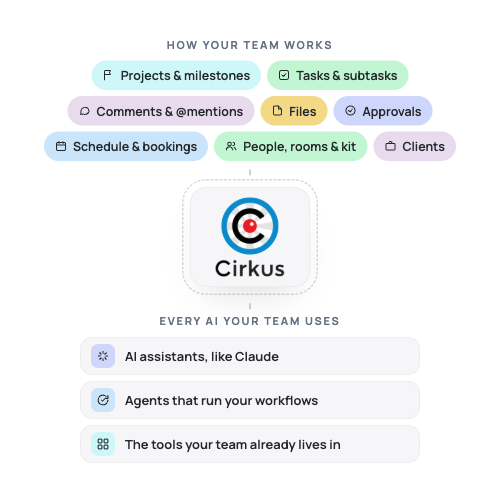
AI is only as useful as what it knows about your work.
Ask a general AI assistant which tasks are blocking Thursday’s show, what the client decided in last week’s thread, or who picked up the fault from the night shift. It has no idea.
The answers live in your projects, task lists, comment threads and schedule. So people copy, paste and re-explain, usually when the clock is already running.
Cirkus already holds that shared picture of the work. We’re opening it up, safely, to the AI your team chooses.
Projects, tasks and the schedule, finally in the same conversation.
For teams exploring AI for project management, Cirkus brings project details, task updates, conversations and resource scheduling into one connected workspace, giving your AI assistant the context it needs to support day-to-day operations.
The why and the what
Projects, subprojects, milestones, clients and templates. Your AI understands what each piece of work is for, who it's for, and where it stands.
“Set up a new project for [Client] from our standard template.”
The who and the how
Tasks, subtasks, owners, statuses, comments, @mentions, files and approvals. Your AI can follow the conversation, raise and assign the work, and keep everyone in the loop.
“Turn these meeting notes into tasks and assign them.”
The when and the where
People, roles, studios, rooms and kit, with their bookings and availability. Your AI knows who and what is free, and spots clashes before they cost you.
“Who on the crew is free Thursday afternoon?”
One truth, for people and AI
The work your team sees is the work your AI sees. No exports, no stale copies.
Always current
Every task update, comment and booking becomes context the moment it’s made.
From answers to action
Your AI can create the task, post the comment and draft the booking, inside the workflows you already trust.
Cirkus MCP at a glance
Cirkus uses secure MCP OAuth authentication to connect your workspace to compatible AI assistants. The AI acts within the permissions of the signed-in user, respecting the workspaces, projects and information they’re authorised to access.


One collaboration hub for studio, AV and master control room teams.
Studio operations
Shows, shoots and client projects, each with its own tasks, crew and studio time. Your AI tracks what’s slipping, who owns it, and what it means for the week’s schedule.
Read MoreAV operations
Events and installs with set-up checklists, client sign-offs, technicians and kit. Your AI turns client changes into updated tasks and bookings, and tells the right people.
Read MoreMCR operations
Around-the-clock shifts, handovers and fault follow-ups. Your AI gives every shift lead a clean handover of open tasks, comments and who’s on, so nothing gets lost between shifts.
Read MoreCirkus is where the work gets organised. Your AI connects it to everything else.
Your AI assistant can connect to many systems at once: your inbox, CRM, helpdesk, billing and Cirkus, side by side. One request can read a client email, create the tasks, check the schedule and draft the reply.
Cirkus brings what the other systems don’t have: the projects, the tasks, who owns them and when the work happens. Together they become workflows shaped around how your operation really runs.
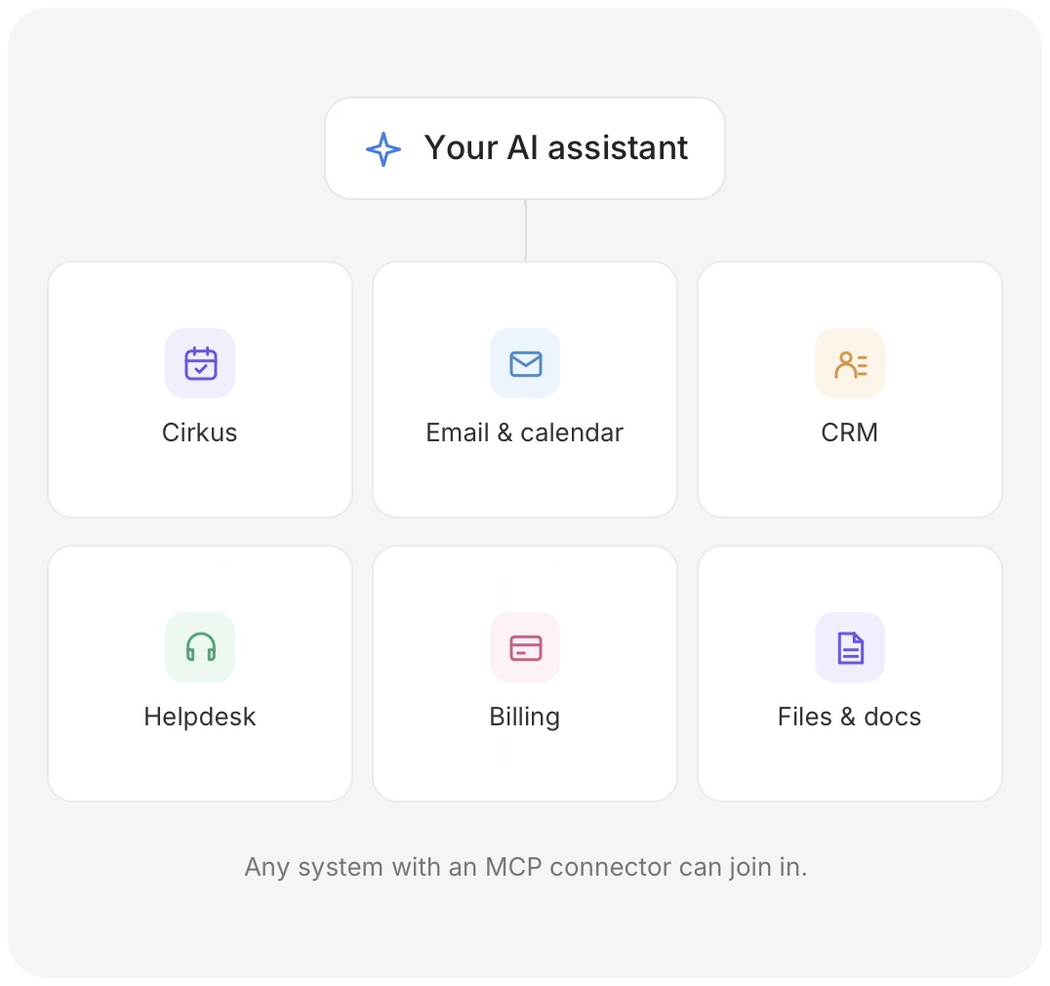
From client email to a project in motion
A client confirms a new job by email. The AI creates the project from your template, raises and assigns the first tasks, checks the crew’s availability, updates the deal and drafts the reply.
From fault ticket to an owned fix
A ticket reports a fault in Gallery B. The AI creates a task for the right engineer, finds the bookings that depend on the gallery, and comments on each so producers know early.
From delivered work to invoiced work
At month end, the AI checks completed projects, tasks and bookings in Cirkus against what’s been billed, and lists anything that slipped through.
Ask like you’d ask the colleague who reads every thread
From production updates to shift handovers, see how your AI assistant can work with information from Cirkus.
Three things need your attention:
- Morning Live has four overdue set-build tasks, and its tech rehearsal milestone is Wednesday.
- The lighting plan for Inside the Frame is waiting on approval from Alex Morgan since Thursday.
- The vision mixer is double-booked on Thursday across both shows.
Want me to nudge the task owners and propose a cover for Thursday?
Illustrative examples. Available actions depend on your connected AI assistant, tools and permissions.
Cirkus MCP security: permission-aware by design.
Opening up your work only makes sense if it’s safe. So the AI acts as the person using it, inside the boundaries your organisation already set.
How to connect Cirkus to ChatGPT, Claude, Cursor and VS Code via MCP
Cirkus has its own MCP server, so you connect your AI assistant directly. No code, no third-party tools.
Works with ChatGPT, Claude, Claude Code, Cursor, VS Code and any AI tool that supports MCP (Model Context Protocol).
1. Choose your AI assistant
Open the MCP connector settings in ChatGPT, Claude, Cursor or VS Code.
2. Connect Cirkus
Add the Cirkus MCP server URL: https://cirkus.com/mcp
3. Log in securely
Sign in to your Cirkus account and approve the connection using OAuth.
4. Start asking
Ask questions about your projects, check task progress and review upcoming work.
We didn’t build another AI. We built the place your AI should look first.
Give every producer, coordinator and shift lead a colleague who already knows the project, the tasks and the plan.
FAQ
What is the Cirkus MCP connector?
The Cirkus MCP connector links your Cirkus workspace to AI assistants such as ChatGPT, Claude, Cursor and VS Code. Once connected, you can ask about projects, tasks, bookings and schedules in plain language and have your AI create or update work, always within your own Cirkus permissions.
What is MCP?
MCP (Model Context Protocol) is an open standard, introduced by Anthropic in 2024, that lets AI assistants connect to external tools and data in a consistent way. An MCP server, such as the Cirkus MCP server, exposes specific information and actions, and the AI assistant uses them.
Which AI assistants work with Cirkus?
Cirkus supports MCP-compatible AI assistants, including ChatGPT, Claude, Claude Code, Cursor and VS Code. Setup requirements may vary depending on the platform.
What can my AI assistant do in Cirkus?
It can read projects, tasks, comments, the schedule, files and more. It can also create and update tasks, projects, bookings and comments, always using your own permissions.
Is my Cirkus data secure?
Cirkus uses OAuth authentication, so you don't need to share your password with your AI assistant. Your existing workspace permissions determine what information and actions your assistant can access. Data handling by the AI provider is subject to its own policies.
Can I use the MCP Connector with a Private Cirkus Cloud?
MCP is available for Private Cirkus Cloud environments, but it isn't enabled by default. Contact Cirkus Support to request activation.
Do I need technical knowledge to use MCP?
No coding is required for the supported setup methods. Once connected, simply ask your AI assistant questions about your Cirkus workspace using natural language.
How do I connect Cirkus to Claude? And to ChatGPT?
Cirkus connects to Claude, ChatGPT and other AI assistants that support MCP (Model Context Protocol).
To get started, open your AI assistant’s connector settings, add Cirkus as a custom MCP server using https://cirkus.com/mcp, and sign in securely with your Cirkus account using OAuth.
Once connected, you can ask questions about your projects, tasks and schedules, and perform supported actions directly through your AI assistant, all within your existing Cirkus permissions.
For step-by-step instructions, visit our MCP Integration Guide.
How is the MCP connector different from an API or a Zapier integration?
APIs let developers build custom integrations, while Zapier connects apps through automated workflows and predefined triggers.
Cirkus MCP connects your workspace directly to compatible AI assistants like Claude and ChatGPT. Instead of setting up individual automations, you can ask questions, retrieve project information and perform supported actions using natural language.
All interactions follow your existing Cirkus permissions, giving you a more flexible way to work with your projects, tasks and schedules.
Can the AI delete or change things, and can I limit it to read-only?
Cirkus MCP allows AI assistants to perform supported actions, including creating and updating projects, tasks, bookings and comments. All actions follow your existing Cirkus permissions, so the AI can only access and modify information you're authorized to work with.
By default all Workspace are configured with read-only access via the MCP, and your Workspce Administrator needs to enable write access.
Find more information on our support article https://support.cirkus.com/support/solutions/articles/17000152016-integrating-cirkus-with-ai-assistants-mcp-oauth-
Which Cirkus plans include MCP?
Cirkus MCP lets you connect your workspace to compatible AI assistants, including Claude and ChatGPT, using your existing Cirkus account.
For details on MCP availability with your subscription, please contact our team at support@cirkus.com.
For private cloud deployments, MCP must be enabled by the Cirkus support team.
Can admins turn MCP off for their organisation?
Workspace Admins can turn off both Read and Write permissions to disable all access.
Find more information on our support article https://support.cirkus.com/support/solutions/articles/17000152016-integrating-cirkus-with-ai-assistants-mcp-oauth-.