
The shared brain behind every project, task and booking.
Your projects, tasks, team conversations and schedule already live in Cirkus. Now the AI your team uses can understand all of it, and get work moving, with exactly the access of the person asking.
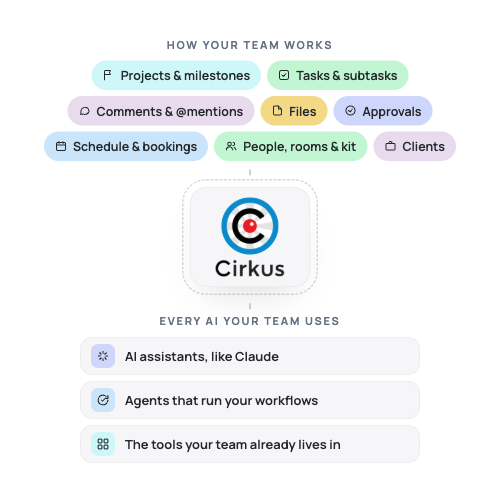
AI is only as useful as what it knows about your work.
Ask a general AI assistant which tasks are blocking Thursday’s show, what the client decided in last week’s thread, or who picked up the fault from the night shift. It has no idea.
The answers live in your projects, task lists, comment threads and schedule. So people copy, paste and re-explain, usually when the clock is already running.
Cirkus already holds that shared picture of the work. We’re opening it up, safely, to the AI your team chooses.
Projects, tasks and the schedule, finally in the same conversation.
Most tools hold one of these. Cirkus holds all three and how they connect, so your AI sees the whole job, not just a slice of it.
One collaboration hub for studio, AV and master control room teams.


Ask like you’d ask the colleague who reads every thread
Set up in minutes
Cirkus has its own MCP server, so you connect your AI assistant directly. No code, no third-party tools.
Works with ChatGPT, Claude, Claude Code, Cursor, VS Code and any AI tool that supports MCP (Model Context Protocol).
1. Choose your AI assistant
Open the MCP connector settings in ChatGPT, Claude, Cursor or VS Code.
2. Connect Cirkus
Add the Cirkus MCP server URL:
3. Log in securely
Sign in to your Cirkus account and approve the connection using OAuth.
4. Start asking
Ask questions about your projects, check task progress and review upcoming work.
We didn’t build another AI. We built the place your AI should look first.
Give every producer, coordinator and shift lead a colleague who already knows the project, the tasks and the plan.
FAQ
What is the Cirkus MCP connector?
The Cirkus MCP Connector links your Cirkus workspace to AI assistants like ChatGPT and Claude. Ask questions about projects, tasks and schedules in everyday language, without switching between multiple views.
What is MCP?
MCP (Model Context Protocol) is an open standard that allows AI assistants to securely connect with external tools and data. With Cirkus MCP, your AI assistant can access authorised workspace information and perform supported actions.
Which AI assistants work with Cirkus?
Cirkus supports MCP-compatible AI assistants, including ChatGPT, Claude, Claude Code, Cursor and VS Code. Setup requirements may vary depending on the platform.
What can my AI assistant do in Cirkus?
It can read projects, tasks, comments, the schedule, files and more. It can also create and update tasks, projects, bookings and comments, always using your own permissions.
Is my Cirkus data secure?
Cirkus uses OAuth authentication, so you don't need to share your password with your AI assistant. Your existing workspace permissions determine what information and actions your assistant can access. Data handling by the AI provider is subject to its own policies.
Can I use the MCP Connector with a Private Cirkus Cloud?
MCP is available for Private Cirkus Cloud environments, but it isn't enabled by default. Contact Cirkus Support to request activation.
Do I need technical knowledge to use MCP?
No coding is required for the supported setup methods. Once connected, simply ask your AI assistant questions about your Cirkus workspace using natural language.