

Educational project management plays a crucial role in the smooth functioning of universities and colleges. Educational projects often involve complex coordination between teams and resources. Unlike corporate environments, universities must manage evolving academic priorities while working across different faculties, administrative units, and student bodies.
This is where simple yet powerful project management tools can make a difference. With the right tools in place, educational institutions can streamline communication, track progress, allocate resources efficiently, and improve collaboration across departments, all without overwhelming faculty or administrative staff.
Understanding Educational Project Management in Universities
Educational project management refers to the planning, execution, and delivery of academic or administrative projects within the education sector. These projects can include curriculum design, academic research coordination, student engagement programs, accreditation processes, and much more.
However, managing projects in education comes with unique challenges.
Managing Diverse Stakeholders and Teams
Universities bring together a wide range of contributors, academic staff, administrators, students, media departments, and external partners such as research institutions or funding bodies. Coordinating tasks and timelines across so many stakeholders can quickly become challenging, especially when different teams work with their own priorities and communication methods. Without a unified approach, projects slow down, messages get lost, and deadlines slip.
This is where effective project planning and digital project management tools make a difference. Centralized platforms provide shared workspaces where teams can organize tasks, timelines, files, and conversations in one structured location.
Tight Deadlines and Changing Priorities
Academic calendars move quickly, and university projects often face strict deadlines with sudden changes due to regulations or shifting priorities. This affects not only academic teams but also campus media departments, which often work under tight production schedules.
Agile project management tools like Cirkus make it easier to adapt by allowing teams to update timelines, reassign tasks, and communicate in real time. This flexibility also helps reduce common virtual team challenges when working with distributed contributors across departments
Resource Management in Educational Projects
One of the biggest challenges in education is managing limited resources: classroom space, equipment, faculty availability, funding, or student support services. Mismanaged resources lead to delays, overbooked spaces, and frustrated teams.
Project management software for education offers resource allocation features that help track availability, prevent conflicts, and keep projects running smoothly.
Key Features of Educational Project Management Tools
Not every tool works for educational settings. Universities and colleges need simple project management tools that adapt to their academic environment. Here are the most useful features:
Task Assignment and Accountability
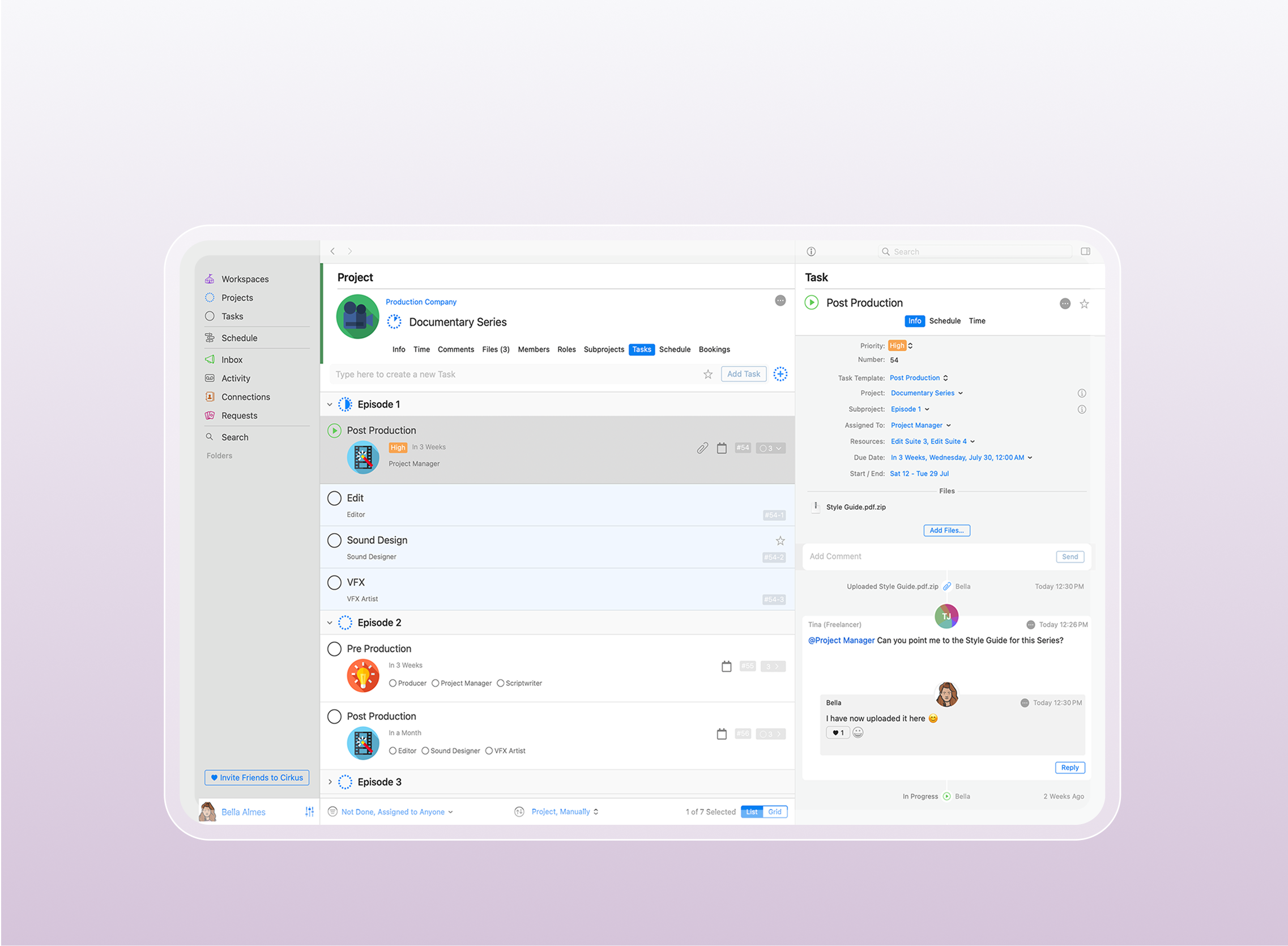
A core feature of educational project management tools is task delegation. Assigning responsibilities clearly helps academic teams stay accountable and ensures tasks don’t fall through the cracks.
Tools like Cirkus, for example, allow users to:
- Assign tasks to individuals or groups
- Set deadlines
- Attach instructions or files
- Monitor progress in real time
This makes it easier to track who is doing what at any point during the project.
Streamlined Scheduling and Resource Management
Effective resource scheduling aligns people and resources at the right time. A project tool with a robust schedule makes it easy to organize production timelines, shoot dates, editing time, and team availability across multiple projects. Allowing team members and collaborators to request resources and have that go for approval is key.
Scheduling tools:
- Prevent double-booking of rooms or equipment
- Allow timeline views for long-term planning
- Support recurring academic tasks
- Keep deadlines visible for all stakeholders

Communication and Collaboration
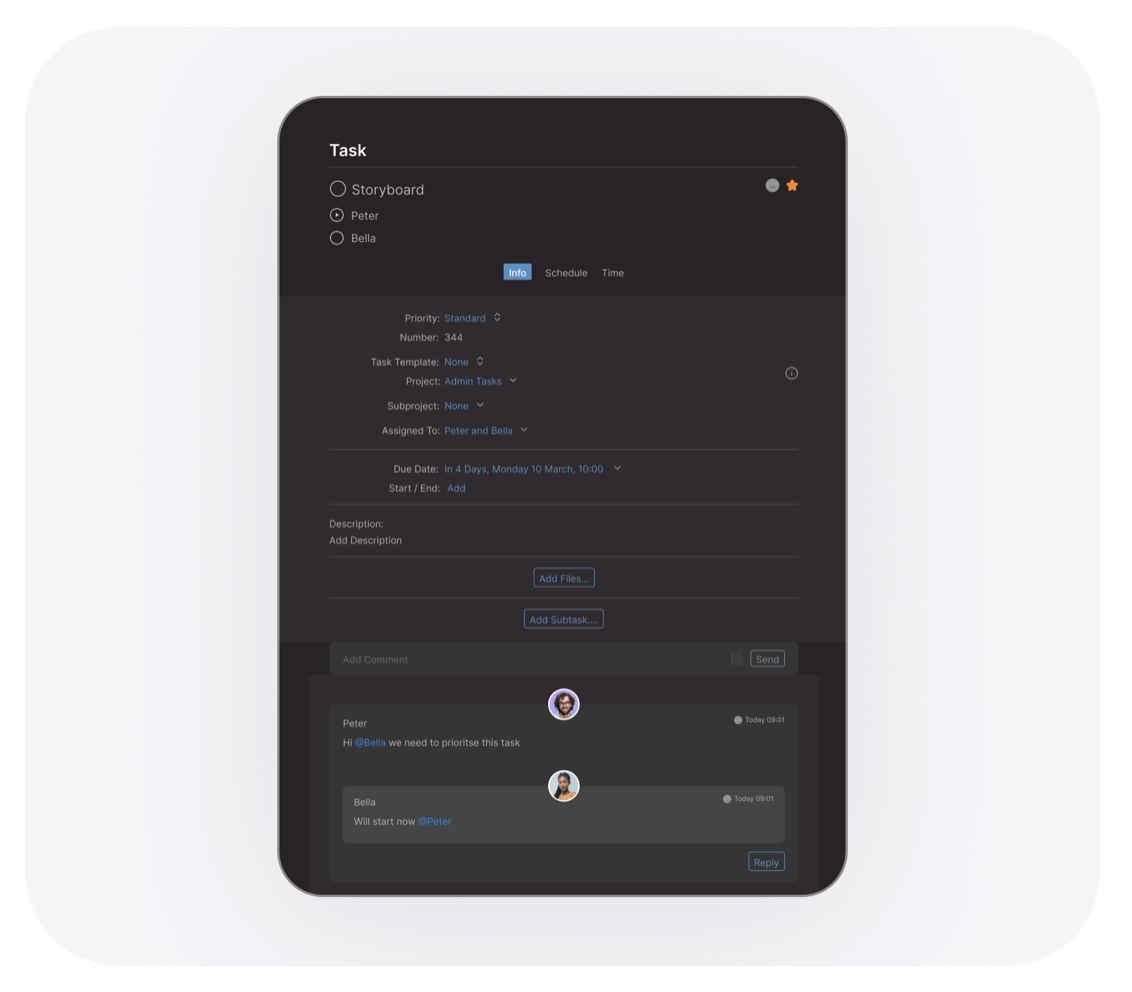
Communication is one of the biggest challenges in academic projects, especially when teams rely on scattered email threads, shared drives, and irregular meetings. Important updates get lost, and miscommunication slows progress across departments.
Project management tools solve this by centralizing communication. Messages, files, and feedback stay connected to their specific tasks, making team collaboration clearer, faster, and more organized.
Practical Benefits of Educational Project Management Tools in University Settings
Implementing digital tools brings measurable improvements to academic workflows.
Increased Efficiency and Productivity
Administrative work can consume valuable time. Project tools automate routine tasks such as approvals, reminders, task assignments, and report updates. Allowing staff and academics to focus more on teaching, mentoring, and research.
Simplified Management of Complex Academic Projects
Educational projects can vary in complexity, but media departments in colleges and universities often manage some of the most demanding workflows. From producing promotional videos and event coverage to managing campus announcements and digital campaigns, these teams must balance multiple creative deadlines while coordinating with academic and administrative departments.
Simple project tools help by:
- Breaking media projects into clear production phases
- Organizing timelines and publishing schedules
- Tracking task dependencies, such as script approval before filming
- Centralizing files, revisions, and communication
Improved Collaboration Across Departments
Collaboration between departments is often essential. For example, a university open day requires coordination between student services, admin, marketing, and facilities teams. With shared project boards, cross-departmental work becomes easier and more transparent.
Transparent Tracking of Progress and Deadlines
Tracking progress is essential for keeping teams accountable, especially in fast-moving media departments where production deadlines are constant. Visual dashboards in project tools show completed tasks, overdue items, and upcoming milestones at a glance. This level of clarity supports smarter planning throughout the project management lifecycle and helps prevent missed publishing dates or delayed academic communications.
Managing Academic Budgets and Resources Efficiently
Educational budgets are limited, especially for public institutions. A simple planning tool helps track spending, allocate funding, and monitor resource usage without complexity. Some platforms even allow cost tracking per task or team, giving administrators better financial visibility.
Risk Management and Adaptability
Project delays can affect academic delivery, funding approvals, and student satisfaction. Project tools improve risk tracking by alerting stakeholders when deadlines slip or resources become unavailable. With visual overviews and timeline adjustments, teams can adapt quickly and maintain project quality.
How to Implement Project Management Tools in Educational Settings
Adopting a new tool doesn’t have to be disruptive. Here’s a step-by-step method for smooth adoption in universities and schools.
Start with Core Features
Begin with essential features like:
- Task management
- Schedule planning
- Communication threads
Once teams are comfortable, introduce more advanced functions like automation, requests or workload tracking.
Training and Onboarding for Faculty and Staff
Successful adoption starts with simple onboarding. Short training sessions and practical walkthroughs help teams learn how to create tasks, assign deadlines, share files, and collaborate efficiently.
Best training practices include:
- Offering short video tutorials for quick learning
- Hosting live webinars to answer common questions
- Providing training with a product specialist who understands your workflow
Regular Review and Tool Optimization
Technology evolves, and so do educational priorities. Universities should periodically review how effectively the tool is being used. Collect feedback from students and faculty and make improvements where needed.
Examples:
- Automate recurring semester planning
- Create project templates (e.g. thesis supervision, course updates)
- Review workload distribution
Conclusion
Effective educational project management doesn’t require complex software or corporate-level solutions. Simple, collaborative tools can help universities and schools organize academic projects, reduce delays, improve communication, and make better use of resources. From managing curriculum development to student programs and research collaborations, the right digital platform brings structure and visibility to projects, without adding complexity.
With thoughtful implementation and gradual adoption, project management tools become a natural part of academic productivity, helping institutions support better teaching, research, and student outcomes.