
Managing multiple projects, deadlines, and team schedules can quickly become overwhelming, especially when plans are constantly changing. Without a clear system, even a well-organized calendar can turn into a collection of overlapping commitments and missed priorities.
That’s where effective calendar management makes a difference.
Whether you’re coordinating a creative agency, managing production schedules, or organizing your own workload, the right approach can help you stay focused, prevent scheduling conflicts, and keep projects moving.
In this guide, we’ll share 10 practical calendar management tips, explain how to build a scheduling system that works for your team, and explore how to handle unexpected changes without losing track of your priorities.
What Is Effective Calendar Management?
Effective calendar management is the process of organizing, prioritizing, and maintaining your schedule so that tasks, meetings, deadlines, and available time are coordinated realistically.
It’s more than simply adding events to a calendar. It means understanding what needs to happen, when it needs to happen, and who is responsible. For individuals, calendar management might involve planning meetings, scheduling focused work, and protecting time for important tasks.
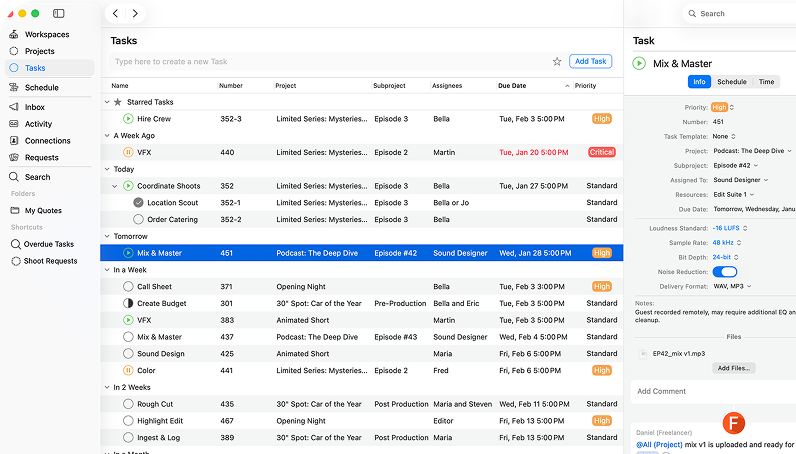
For teams, it becomes more complex. A project management calendar connects deadlines, milestones, assignments, and team availability, giving everyone a clearer understanding of the work ahead.
For example, a creative agency preparing a video campaign needs to coordinate script approvals, filming dates, editing sessions, and final delivery. A shared calendar helps the team see how these activities fit together rather than managing each deadline separately.

- Collaborate from every device
- Automate tasks and workflows
- See all projects at a glance
- Make quotes in minutes
Why Is Calendar Management Important for Teams?
When several people are working toward the same deadline, one scheduling issue can affect an entire project.
Imagine a production team preparing a client video. The filming day is booked, but the editor isn’t available until after the delivery deadline. Without visibility into team availability, that problem might only become apparent when it’s too late.
Effective calendar management helps teams:
- Meet deadlines more consistently: Keep important delivery dates and project milestones visible.
- Avoid double bookings: Understand existing commitments before assigning new work.
- Balance workloads: Identify overloaded team members and available capacity.
- Improve coordination: Make it clear who is responsible for each stage of a project.
- Respond to changes: Understand how delays or new priorities affect upcoming work.
For creative, media, and production teams, scheduling isn’t just about time. It’s also about coordinating people, equipment, approvals, and project dependencies.
A reliable calendar provides the visibility needed to make better decisions before small scheduling problems become bigger ones.
10 Calendar Management Tips to Stay Organized and Productive
Good calendar management doesn’t require a complicated system. It starts with a few consistent habits: prioritizing work, protecting time, making deadlines visible, and keeping everyone informed.
Here are 10 practical ways to improve your daily scheduling and project planning.
1. Set Clear Priorities Before Scheduling Tasks
Before filling your calendar, decide what actually needs to get done. Not every task deserves the same level of attention. Some activities have fixed deadlines, while others can be moved without affecting the overall project.
Start by identifying:
- Tasks with urgent or fixed deadlines.
- Important activities that directly contribute to project goals.
- Work that depends on another person’s input or approval.
- Two or three key outcomes you want to achieve that day.
For example, if your agency is delivering a campaign tomorrow, reviewing the final creative assets should probably take priority over routine administrative work.
A useful approach is to distinguish between urgent tasks and important tasks. This helps prevent your calendar from being dominated by last-minute requests while longer-term priorities get pushed aside.
Quick tip: Review your priorities before accepting new meetings or commitments. A full calendar doesn’t necessarily mean a productive one.
2. Use Time Blocking for Focused Work
Time blocking means reserving specific periods in your calendar for particular activities rather than working from an open-ended task list.
For example, a designer might organize their day like this:
- 9:00–11:00 AM: Design campaign assets.
- 11:00–11:30 AM: Review feedback.
- 11:30 AM–12:00 PM: Team check-in.
- 1:00–3:00 PM: Work on client revisions.
- 3:00–3:30 PM: Review priorities for tomorrow.
By assigning dedicated time to important tasks, you reduce the temptation to switch constantly between unrelated activities.
Time blocking is particularly useful for creative work that requires concentration, such as editing, writing, design, or production planning.
However, avoid treating every block as a fixed deadline. Some work takes longer than expected, so leave room to adjust your day.
3. Keep Deadlines Visible in One Shared Calendar
When deadlines are scattered across emails, spreadsheets, personal calendars, and messaging platforms, it’s easy for important information to get missed.
A shared calendar makes team scheduling easier by giving everyone a common reference point. For example, if an agency is launching a campaign on Friday, the account manager, designer, and production team should all be able to see the relevant delivery deadline.
A good project management calendar should make it easy to identify:
- Upcoming project milestones.
- Important delivery dates.
- Assigned work and responsibilities.
- Scheduled meetings and production activities.
That doesn’t mean everyone needs an identical calendar view. Team members can still focus on their own schedules while working from the same agreed project information.
For larger projects, creating a project master schedule can also help connect individual deadlines to the wider production timeline.
4. Leave Buffer Time Between Commitments
One of the most common schedule management mistakes is booking everything back-to-back. A one-hour meeting often needs extra time for preparation, follow-up notes or moving on to the next task.
The same applies to creative production. An editing session may require additional time for exporting files, reviewing changes or handling unexpected feedback. Instead of filling every available slot, leave reasonable gaps between commitments.
It’s also important to distinguish between fixed deadlines and flexible tasks. A live production date might be immovable, while an internal planning session can be rescheduled when priorities change.
5. Choose Useful Views and Simple Color Coding
Effective calendar planning starts with choosing the right view for your needs:
- Daily view: Manage immediate tasks and priorities.
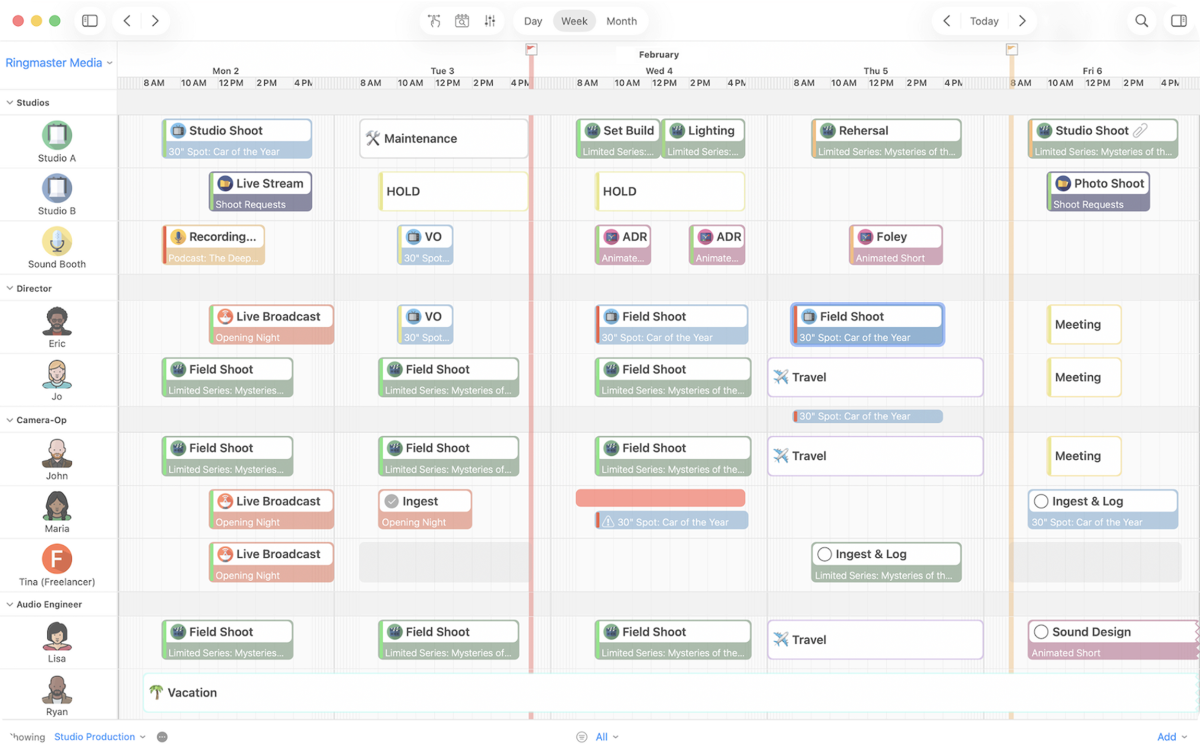
- Weekly view: Spot overlapping deadlines, meetings and workloads.
- Monthly view: Track upcoming projects, campaigns and milestones.
Use each view for a different purpose, and add colour coding to distinguish meetings, deadlines and bookings at a glance.
Keep the system simple and consistent. Too many colors can make a calendar harder to interpret rather than more useful.
6. Check Team Availability Before Booking Work
A task might fit perfectly into your project timeline, but that doesn’t mean the person responsible is available.
Before scheduling new work, check:
- Existing bookings and assignments.
- Working hours and planned absences.
- Other project commitments.
- Time zones for remote team members.
- Whether the required resources are available.
For example, if two editors are working on separate projects and a new urgent job arrives, checking their schedules helps you understand who has the capacity to take it on. This becomes even more important for teams coordinating people, studios, equipment, or production facilities.
7. Set Reminders for Key Deadlines and Approvals
Even a well-organized calendar can’t help if nobody remembers to check it. Reminders are useful for important deadlines, meetings, and approvals, particularly when one person’s action affects the next stage of a project.
For example, a producer might need a reminder two days before a client approval deadline so there’s enough time to follow up.
Different activities may require different notification timings:
- Meeting reminders shortly before an appointment.
- Deadline reminders a day or two in advance.
- Approval reminders before the next production stage begins.
The key is to make notifications useful rather than overwhelming. If every small task generates an alert, important reminders become easier to ignore.
8. Review and Refresh Your Calendar Regularly
Project priorities shift, deadlines change, and new tasks come up. Regularly reviewing your project tracking calendar helps keep schedules accurate, projects on track, and teams aligned. Build two simple habits into your routine:
Daily review: Spend a few minutes checking upcoming commitments, outstanding tasks, and anything that needs to be rescheduled.
Weekly review: Look ahead at major deadlines, team availability, and potential workload conflicts.
During these reviews, remove outdated events, update task dates, and check whether planned work still fits the time available.
For project managers, this is also an opportunity to identify delays before they affect delivery. The goal is to keep your schedule useful and accurate, not just visually organized.
9. Notify People When Their Schedule Changes
Updating a shared calendar is important, but it doesn’t always mean everyone affected has noticed the change.
Imagine a client delays approval of a video edit. The editor’s booking may need to move, but the producer, account manager, and anyone waiting for the final file also need to know.
When plans change, communicate:
- What has changed.
- Which tasks or deadlines are affected.
- Who is responsible for the next action.
- Whether other bookings need to move.
Keep these updates close to the relevant project or task whenever possible, rather than spreading the conversation across multiple email threads.
Clear communication is an essential part of effective team collaboration, particularly when several people depend on the same schedule.
10. Connect Calendars With Task and Project Management
A traditional calendar is useful for appointments and deadlines, but it doesn’t always provide enough context to manage a complete project.
For teams managing multiple deliverables, connecting scheduling with task and project management creates a more useful workflow calendar.
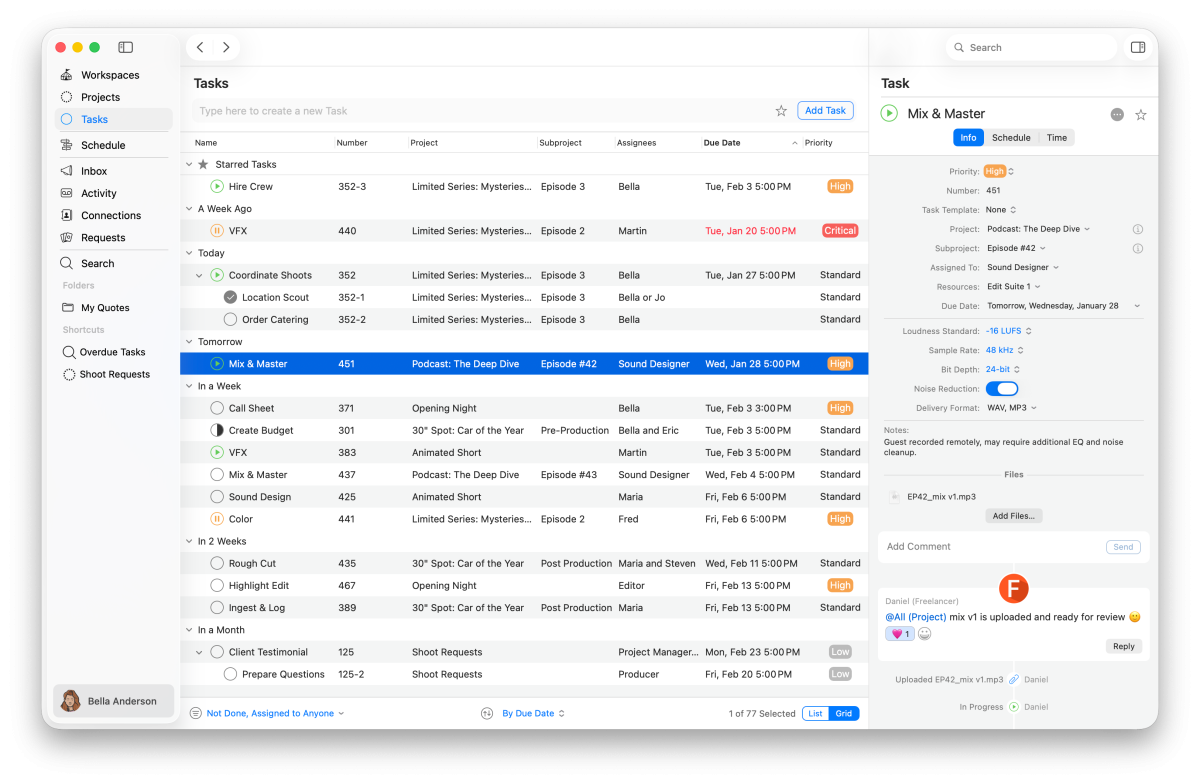
Platforms like Cirkus bring tasks, projects, resource bookings, and schedules together, helping teams organize work without treating every activity as an isolated calendar event. Cirkus also supports external calendar synchronization, allowing scheduled tasks and bookings to appear in Google Calendar, Apple Calendar, and Outlook. Updates depend on the destination calendar’s refresh frequency rather than occurring instantly.
How to Set Up a Calendar Management System
Once you’ve established good scheduling habits, the next step is building a system that works for your team.
The best approach depends on your project complexity, number of team members, and how often schedules change.
Step 1: Choose a Calendar System for Your Team
Start by deciding how much scheduling visibility you need.
- A personal calendar may be enough for someone managing individual meetings and deadlines.
- A shared team calendar works well when several people need visibility into common events.
- A project management platform becomes more useful when scheduling involves task assignments, dependencies, resources, and multiple projects.
For example, a small creative agency producing a weekly video series might need to coordinate filming, editing, approvals, and delivery. In that situation, a calendar connected to the project provides more context than a collection of separate appointments.
Choose a system that supports the way your team works rather than introducing unnecessary complexity.
Step 2: Add Meetings, Deadlines, and Task Owners
Once you’ve selected your system, start with the information that matters most. For each significant activity, record the relevant project, responsible person, expected duration, and deadline.
Consider a simple weekly video production:
| Activity | Owner | Target day |
| Script approval | Producer | Monday |
| Filming | Production team | Tuesday |
| Video editing | Editor | Wednesday |
| Client review | Account manager | Thursday |
| Final delivery | Producer | Friday |
This provides a basic calendar for project planning and makes the sequence of work easier to follow.
Not every small task needs its own calendar event. Focus on activities that require scheduled time, affect another person’s availability, or contribute to an important milestone.
Step 3: Agree on Sharing and Calendar Synchronization
Before your team starts using a project management calendar, set a few clear guidelines. Define who can view or edit schedules, where project deadlines are tracked, and how updates should be communicated.
If your team uses multiple calendar tools, establish one central source of information to keep everyone aligned and avoid confusion.
For example, Cirkus allows users to subscribe to personal, project, or workspace schedules through supported external calendars, including Google, Apple, and Outlook.
These subscriptions help display Cirkus bookings and scheduled tasks alongside other commitments, but they shouldn’t be mistaken for instant two-way synchronization.
Having a clear source of truth helps prevent duplicate entries, conflicting information, and unnecessary administrative work.
How to Handle Last-Minute Schedule Changes
Even the most carefully planned project calendar will need adjustments. A client requests another revision, a team member becomes unavailable, or a production takes longer than expected.
The important thing is having a clear process for responding.
Imagine a creative agency preparing a campaign launch when the client requests significant changes to the final video. Here’s a practical five-step approach:
- Identify the affected work. Determine which tasks, bookings, and deadlines need to change. In this case, additional editing and review time may be required.
- Check dependencies. Understand which activities rely on the revised video, such as final approval or publishing.
- Assess available capacity. Check whether the editor and other necessary team members can accommodate the changes.
- Update the schedule. Adjust the relevant tasks, assignments, and deadlines in the agreed scheduling system.
- Notify the people involved. Explain the revised plan, responsibilities, and any effect on the launch date.
This approach helps teams make informed scheduling decisions instead of reacting to each change separately. For production teams, the same principles apply when updating a shooting schedule or coordinating changes to crew and equipment bookings.
Common Calendar Management Mistakes to Avoid
Even experienced teams can fall into scheduling habits that make projects harder to manage.
Here are some common mistakes and how to address them.
| Common mistake | Why it causes problems | How to fix it |
| Overscheduling | Leaves no room for unexpected work | Plan around realistic capacity |
| Underestimating tasks | Creates delays that affect other commitments | Use previous projects to improve estimates |
| Unclear ownership | Tasks may be missed or duplicated | Assign a responsible owner |
| Multiple sources of truth | Teams work from conflicting deadlines | Agree on one primary project schedule |
| Outdated calendar entries | Creates confusion about current plans | Review and maintain schedules regularly |
The most effective approach to calendar project management isn’t necessarily the most detailed one. It’s the one your team can rely on to stay organized and make informed decisions.
How Cirkus Helps Teams Manage Shared Schedules
Managing a calendar becomes easier when your tasks, projects, team members, and bookings are connected.
Cirkus is project management, scheduling, and collaboration software designed to help teams organize their work in one place.
Instead of managing assignments separately from the production schedule, teams can use Cirkus to:
- Organize tasks and deadlines: Assign work to team members and keep track of upcoming deliverables.
- Schedule people and resources: Create bookings for team members, roles, and equipment.
- See the bigger picture: Review project schedules, workspace bookings, and individual commitments.
- Keep project communication connected: Discuss work and share updates within tasks and projects.
- Connect external calendars: Subscribe to Cirkus schedules in Google Calendar, Apple Calendar, or Outlook.
For example, a post-production team working on several client projects can organize editing tasks, schedule editors and equipment, and review bookings across the workspace.
When a delivery date changes, the team can update the relevant assignments and schedule in Cirkus while keeping the project information together.

Conclusion
Effective calendar management isn’t about filling every hour of your day. It’s about making time for the right work, keeping deadlines visible, and helping everyone understand what’s coming next.
By setting realistic priorities, checking availability, maintaining shared schedules, and communicating changes clearly, teams can reduce scheduling confusion and keep projects moving.
And when you’re managing multiple people, projects, and resources, having everything connected can make a real difference.
Ready to organize your team’s schedule more effectively?
Try Cirkus free for 30 days or book a personalized demo to see how task management, project planning, and resource scheduling can work together.
Frequently Asked Questions About Calendar Management