

Project tracking is the practice of monitoring how work progresses against a plan: timelines, tasks, responsibilities, and resources. In post-production, where multiple teams, versions, and approvals intersect daily, effective project tracking is critical to keeping work moving smoothly.
When post-production projects go wrong, it’s rarely due to a lack of creative talent. More often, it’s poor coordination, unclear ownership, version confusion, or the absence of a clear overview. This article explains how to choose the right project tracking tools for post-production workflows, shares practical tracking methods, and helps teams avoid bottlenecks by improving visibility and accountability, not just by listing tools.
What Is Project Tracking?
Project tracking is the process of continuously monitoring a project’s progress to ensure it stays aligned with its goals, schedule, and scope. It involves tracking tasks, deadlines, dependencies, and ownership so teams know what’s done, what’s in progress, and what’s at risk.
In post-production, project tracking is especially important because work passes through many hands, editors, colorists, sound designers, producers, and clients, across a complex post production workflow. Effective project tracking reduces delays, improves communication, and helps teams spot issues early before they impact delivery dates or budgets.

What Is a Project Tracker?
A project tracker is a tool or system used to record and monitor project progress in one central place. Instead of relying on spreadsheets, emails, or disconnected tools, a project tracking tool provides teams with real-time visibility into how work is progressing against the plan.
A project tracker helps teams:
- See task status at a glance
- Understand priorities and dependencies
- Identify risks early
- Keep everyone aligned on deadlines and responsibilities
For post-production teams, effective project management for creative teams relies on a project tracker that replaces manual updates and scattered communication with a shared source of truth.
Why is tracking project progress important? Benefits of project tracking software
Tracking project progress matters because it gives teams control and predictability, two things that are often missing in fast-paced post-production environments. Using dedicated project tracking software delivers clear, practical benefits:
- Improved visibility: Everyone can see what’s happening, what’s blocked, and what’s next
- Fewer delays: Issues are identified early, before they escalate
- Clear accountability: Tasks have owners, deadlines, and priorities
- Better collaboration: Teams communicate in context, not across disconnected tools
- Accurate project time tracking: Teams can record hours worked and understand effort vs. estimates
- More reliable delivery: Projects stay aligned with timelines and client expectations
How to Track Project Progress
Tracking progress effectively requires structure and consistency. Below are the key steps teams should follow when setting up a reliable project tracking process.
Define Project Objectives, Scope, and Deliverables
Start with a clear plan. You can’t effectively track progress if you don’t know what success looks like from the outset. Defining objectives early helps align everyone involved and keeps the project moving in the right direction. These objectives should be specific, measurable, and time-bound so there’s no ambiguity around what needs to be delivered and when.
For example, a deliverable might be “Final picture lock approved by the client by Friday” or “Sound mix delivered in a broadcast-ready format.” Clearly defined deliverables remove guesswork, reduce back-and-forth, and make it easier for teams to assess progress, spot delays early, and confidently confirm when work is truly complete.
Define Schedule and Scope Clearly
Clear schedules and well-defined scope help teams understand what needs to be done and when. Planned timelines set expectations, while a defined scope ensures everyone knows which tasks and deliverables are included.
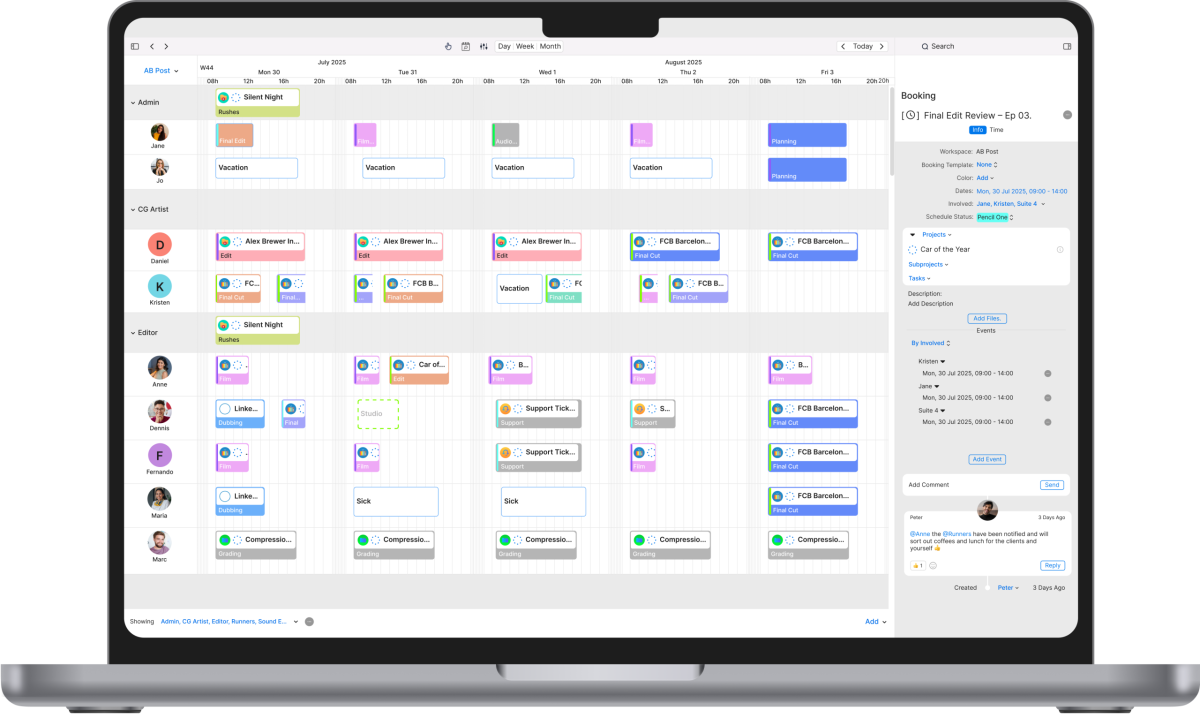
With project tracking tools like Cirkus, teams can monitor real progress against planned work in real time, making it easier to spot changes early, adjust schedules, and keep projects on track before deadlines are affected.
Break Work into Tasks and Milestones
Breaking work into smaller, manageable tasks makes progress measurable and easier to track. Each task should have a clear owner, defined deadline, priority, and current status so everyone understands who is responsible and what needs to happen next. This level of detail helps teams spot delays early, coordinate handoffs smoothly, and maintain accountability throughout the workflow.
Milestones act as major checkpoints in the project timeline, such as “Rough cut approved” or “Final delivery completed.” They represent significant phases of progress and help teams visualize how individual tasks contribute to the bigger picture. Milestones also provide natural moments to review work, align with stakeholders, and recognize key achievements as the project moves forward.
Use the Right Project Tracking Tools
The right project tracking tools brings everything into one place – schedules, tasks, files, and communication. Instead of relying on spreadsheets, emails, or manual tracking, teams benefit from a single source of truth with real-time updates, shared visibility, and a reliable record of progress.
In post-production, this is especially important. Projects often involve complex workflows, multiple stakeholders, and several rounds of approvals. A dedicated tracking tool helps manage these moving parts in one system, making it easier to coordinate creative collaboration, keep timelines on track, and ensure nothing slips through the cracks.
Monitor Progress Regularly and Keep your project tracker up to date
Project tracking only works if data is current. In enterprise project management, where multiple teams and projects run in parallel, task status should be updated daily or weekly to ensure the tracker reflects reality at all times. Consistent updates give teams and stakeholders a reliable view of progress, dependencies, and potential risks.
When information becomes outdated, it leads to poor decisions, missed deadlines, and unnecessary stress, reinforcing why consistency is essential for maintaining visibility, alignment, and control across complex projects.
Create and Share Progress Reports
Progress reports summarize project health for teams and stakeholders by providing a clear snapshot of where work stands. These reports can be shared daily, weekly, or monthly, depending on the pace and complexity of the project, and typically include milestones reached, upcoming tasks, identified risks, blockers, and any changes to scope or timelines.
Clear, consistent reporting helps teams make informed decisions, keeps stakeholders aligned on expectations, and reduces the need for constant check-ins or status meetings, allowing everyone to stay focused on delivering the work.
Best Project Tracking Tool for Post-Production
Before choosing the best project tracking software, it’s important to understand which features matter most for post-production teams:
- Task tracking & dependencies: Clear task status, timelines, and handoffs
- Real-time collaboration: Comments, notifications, and file sharing
- Project time tracking: Accurate tracking of hours worked and billable time
- Custom views & dashboards: Boards, lists, timelines, calendars
- Automations & integrations: Connections with creative tools and communication platforms
- Reporting & metrics: Dashboards that show progress and performance
Cirkus is a project tracking tool built specifically for media and post-production workflows. It provides centralized task and project tracking, real-time collaboration, time tracking, and resource scheduling. All designed to help teams manage complex projects with multiple contributors.
By bringing schedules, tasks, and communication into one place, Cirkus supports structured project tracking while still respecting and enabling creative workflows, rather than getting in their way.
3 Key Project Tracking Strategies
Effective tracking looks different depending on what you’re monitoring, individual work, a single project, or multiple projects at once, with methods like critical path analysis helping teams understand dependencies and prioritize work. Below are three core project tracking strategies.
1. Tracking Work at an Individual Level
This strategy focuses on day-to-day work by individual contributors, using project tracking tools to monitor what each person is working on, how long tasks take, and whether work is progressing according to schedule. By making individual responsibilities and time investment visible, teams can better understand workloads and spot potential delays early.
Individual-level tracking improves accountability, supports accurate project time tracking, and helps teams estimate future work more reliably. Over time, the data captured through project tracking tools also enables teams to plan resources more effectively and improve predictability across projects.

2. Tracking Work at the Project Level
Project-level tracking focuses on the health of a single project. It looks at milestones, scope alignment, deadlines, risks, and overall progress rather than individual task effort.
This approach ensures the project stays aligned with creative goals, client expectations, and delivery timelines.
3. Tracking Work Across Multiple Projects
Multi-project tracking provides visibility across several active projects at once. By strengthening multitasking skills, this approach helps teams balance resources, prioritize work, and avoid over-commitment.
For teams managing multiple clients, portfolio-level tracking is essential to maintaining efficiency and meeting deadlines across the board.
Track Your Projects Progress with Cirkus
Choosing the right project tracking tool isn’t about adding complexity, it’s about creating clarity. With the right structure, tools, and tracking strategies in place, post-production teams can reduce friction, improve collaboration, and deliver work more consistently and predictably.
Cirkus supports structured project tracking by bringing task management, collaboration, and time tracking together in a single platform. When paired with clear processes and regular updates, it helps teams stay focused on creative work while maintaining visibility and control across every project. For teams looking to improve how they plan, track, and deliver work, Cirkus is a practical solution worth trying.