

Post-production is where creative ideas come together, but it’s also where deadlines tighten, feedback increases, and workflows become more complex. The right post-production management tool helps teams stay organized, communicate clearly, manage approvals, and keep projects moving without unnecessary delays.
In this guide, we’ll cover why project management matters in post-production, which features to look for, and how to choose the best tool for your team.
Why Project Management Is Critical in Post-Production
Post-production involves much more than just editing footage. Teams must coordinate a variety of elements, including video editing, sound design, visual effects, color correction, client reviews, approvals, and final delivery. Modern post-production teams often encounter several challenges, such as:
- Managing multiple deadlines across different projects
- Coordinating between internal teams and external stakeholders
- Tracking revisions and approvals
- Handling large volumes of assets and files
Effective project management in media is essential for maintaining creative momentum. This is why post-production management tools are crucial for navigating complex projects, scaling operations, and improving collaboration between creative and operational teams in fast-paced environments.
Key Features to Look for in Post-Production Task Management Tools
The importance of project planning becomes clear when comparing different post production software options.
Before choosing a platform, it’s important to understand which features matter most for your workflow and how each tool can support your team’s post-production process.
Task tracking & assignment
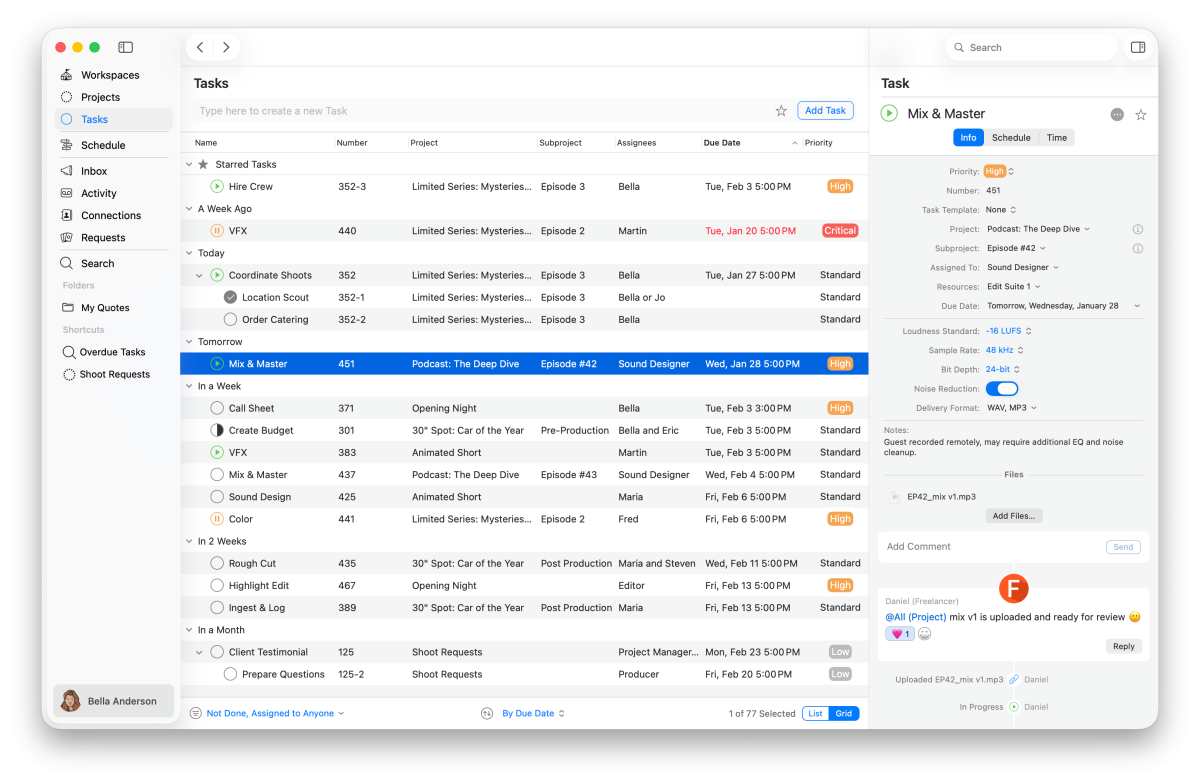
The foundation of any production management platform is task organization. Teams should be able to:
- Break projects into smaller tasks
- Assign responsibilities clearly
- Set priorities and deadlines
- Track project progress in real time
Clear task tracking reduces confusion and helps ensure accountability across the production pipeline. This becomes especially important when handling multiple productions simultaneously or coordinating remote teams.
Collaboration and communication tools
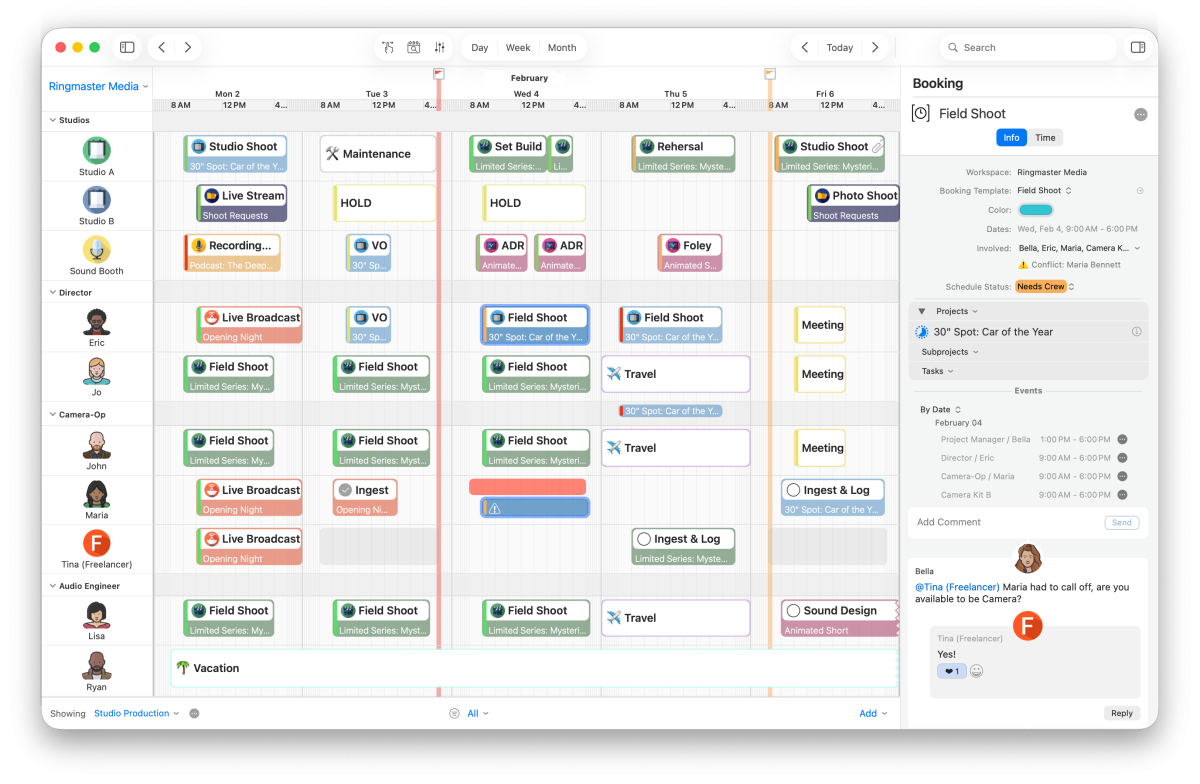
Post-production management depends on clear feedback, fast approvals, and effective collaboration tools for teams. The best post-production management tools help centralize communication, making it easier to manage real-time comments, file sharing, approvals, feedback tracking, and review workflows in one place.
Instead of relying on scattered email threads or separate messaging apps, teams can keep conversations connected to the work itself. This improves visibility, reduces confusion, and helps creative teams move through revisions faster.
Time tracking and deadline management
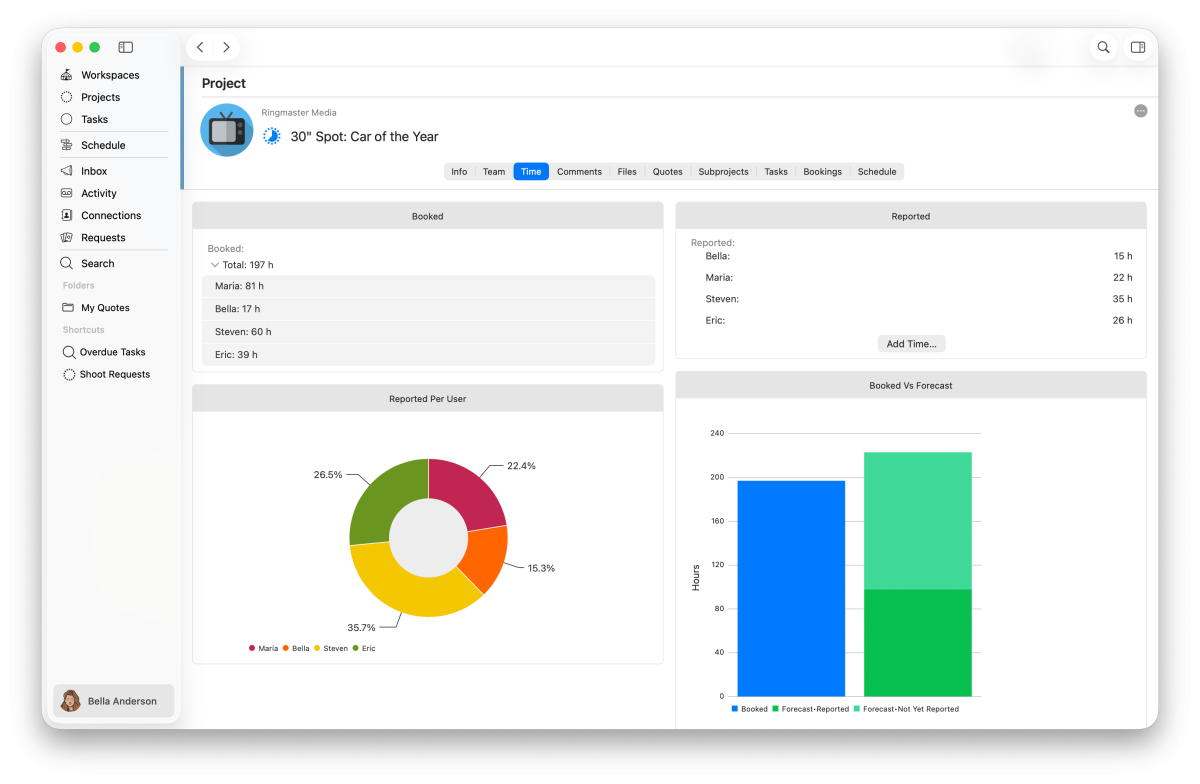
Time tracking plays an important role in the project management life cycle, especially in post-production where deadlines are tight and priorities can change quickly. A strong production management platform helps teams track hours spent on tasks, monitor timelines, identify delays early, and understand how workloads are distributed across the team.
With better time reporting, teams can improve scheduling accuracy, reduce bottlenecks, and make more informed decisions throughout the project management life cycle.
Integration with other tools
Most creative teams rely on multiple tools for editing, communication, storage, and asset management. A strong post-production management tool should integrate smoothly with other platforms to create more efficient workflows and reduce unnecessary manual work between systems.
Customization and scalability
Every team has a different post-production management process, so the best post production solutions should allow teams to customize workflows, dashboards, task structures, notifications, and automations.
Scalability is also important. The right tool should continue supporting your team as projects, departments, and client demands grow, making it a valuable part of your long-term production strategy.
What Are the Post-Production Management Tools?
There are many project management productivity tools available today, each designed to solve different post-production workflow challenges. Some focus on review and approval workflows, while others specialize in production scheduling, resource management, or full-scale project coordination.
Below are some of the best post-production management tools currently used by creative and media teams.
Frame.io
Frame.io is a platform for video review and approval workflows. It allows teams and stakeholders to leave timestamped comments, review different versions, and manage approvals within a single workspace, helping centralize the feedback process.
Primary Use Case: Suitable for video teams that require tools for review, feedback, and approval workflows.
Monday.com
Monday.com provides project management through configurable workflows, boards, timelines, and dashboards. It helps teams organize tasks and track project status in a shared workspace.
Primary Use Case: Suitable for teams looking for general project tracking and customizable workflows.
ShotGrid
As Autodesk’s dedicated tool for animation and VFX pipelines, ShotGrid offers task tracking and workflow automation. It provides visibility across large productions, supported by powerful pipeline management and reporting tools.
Primary Use Case: Best for large VFX, animation, and enterprise production teams.
farmerswife
farmerswife is built for production companies that need more than simple project tracking. It combines scheduling, resource management, project coordination, bookings, and financial visibility in one platform. This makes it especially useful for teams managing people, rooms, equipment, budgets, and multiple productions at the same time.
Primary Use Case: Best for media and production companies that need strong operational control as well as project management.
Wipster
Wipster focuses on video feedback and approvals. It offers frame-accurate commenting, version control, and a simple review process, making it easy for clients and creative teams to collaborate.
Primary Use Case: Best for freelancers and smaller creative teams that need quick video approvals.
StudioBinder
StudioBinder is designed for film and video production planning. It includes tools for call sheets, shooting schedules, and production coordination.
Primary Use Case: Best for film and video teams that need simple scheduling and production coordination.
Airtable
Airtable combines spreadsheet-style organization with database functionality to support content calendars, asset libraries, and production data management.
Primary Use Case: Suitable for teams looking for a customizable system to organize production information and workflows.
Cirkus
Cirkus is a project and task management platform built for media professionals, combining operational clarity, collaboration, and ease of use. It helps teams manage tasks, approvals, schedules, quotes, and conversations across departments in one shared workspace. Its flexible structure supports evolving production needs without adding unnecessary complexity.
Primary Use Case: Best for creative and media teams seeking a scalable project management solution tailored to production workflows.
How to Choose the Right Post-Production Management Tool
Choosing the right post-production management tool depends entirely on your team’s workflow, structure, and production needs. There is no universal solution that fits every studio or creative department. Here are some of the most important factors to evaluate before making a decision.
Team size: Smaller creative teams often use simple tools with basic collaboration features, while larger organizations may need reporting, resource management, permissions, and automated workflows. Post-production solutions should be flexible enough to support both current needs and future growth.
Budget: Project management for creative teams involves various platforms that offer affordable plans for freelancers and smaller teams, while more advanced tools can become significantly pricier for enterprises. It’s essential to evaluate subscription costs, per-user pricing, scalability expenses, and any additional integration costs.
Tool compatibility: Your project management system should work well with the tools your team already uses. Strong post-production solutions connect with editing software, cloud storage, communication tools, and review platforms to support smoother workflows and reduce manual work. Open APIs can also allow teams to configure integrations based on their needs.
Customization: Every production workflow is unique. Look for tools that allow customization of workflows, views, notifications, automations, and task structures. This flexibility enables the platform to adapt to your process rather than forcing teams into rigid systems.
| Tool | Main Strength | Best For | Potential Limitation |
| Frame.io | Video review, comments, and approvals | Teams focused on feedback cycles | Limited for scheduling, resources, and wider project operations |
| Monday.com | Flexible boards and visual project tracking | General creative project management | Not built specifically for post-production, so setup can take time |
| ShotGrid | VFX and animation pipeline management | Large studios and complex productions | Can be too complex for smaller or fast-moving teams |
| farmerswife | Scheduling, resources, bookings, project tracking, and financial visibility | Production companies needing full operational control | More detailed than lightweight task tools, so onboarding matters |
| Wipster | Simple video feedback and approvals | Freelancers and small creative teams | Limited for advanced production planning or operations |
| StudioBinder | Call sheets and production scheduling | Film and video production planning | Less focused on full post-production management |
| Airtable | Custom databases and flexible workflows | Teams building their own systems | Requires manual setup and ongoing maintenance |
| Cirkus | Project and task management, collaboration, approvals, and scheduling | Creative, media, and post-production teams needing clear project visibility | May need to be integrated with more specialized tools for very complex financial, invoicing or reporting needs |
Final Thoughts: Maximize Your Post-Production Efficiency with the Right Tools
Post-production workflows are fast-paced, collaborative, and complex, and having the right management tool can make a significant difference. An effective platform enables your team to streamline tasks, centralize communication, track progress, and manage deadlines with greater confidence.
By avoiding issues such as scattered feedback, unclear ownership, and manual updates, your team can concentrate on delivering high-quality creative work more efficiently. Before selecting a tool, take the time to evaluate your workflow and identify essential features, integrations, scalability, and available trials or demos.
If you’re exploring options for your post-production workflow, consider booking a demo of Cirkus or signing up for a free trial to see how it fits your team’s processes and requirements.
Publisher
This article is published by THE ELECTRONIC FARM USA, INC.
401 Wilshire Boulevard, 12th Floor, Santa Monica, CA 90401, United States.